AI-Powered ITAM: Why Automated, Accurate, Complete Data is the Foundation for Success
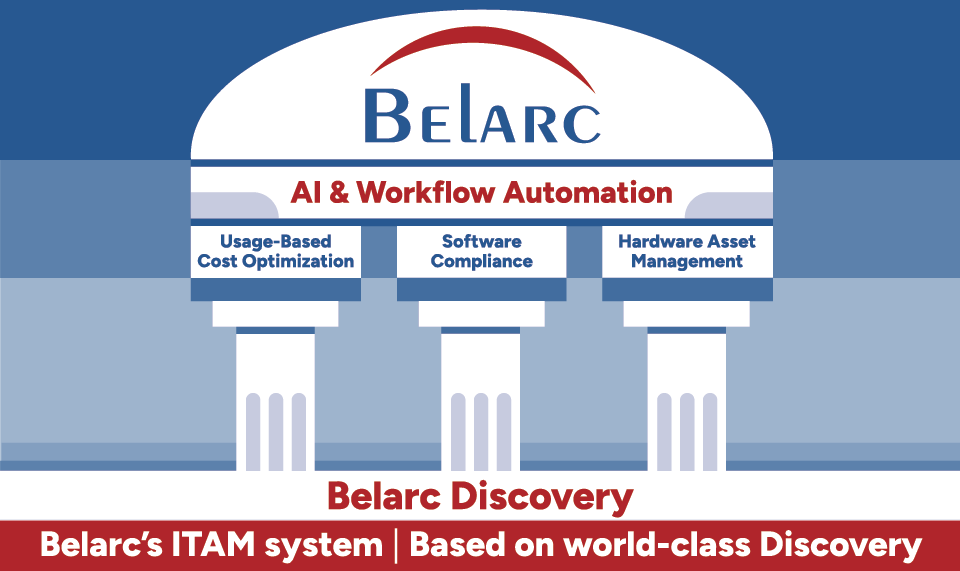
Everyone in the ITAM industry is talking about AI. Vendors are promising automated license optimization, predictive hardware refresh, real-time compliance dashboards — all driven by machine intelligence. Some of it is genuine. A lot of it is marketing. But whether the AI is real or overhyped, one thing is certain: none of it works without good data.
That’s the problem most organizations haven’t solved yet. They’re being sold AI-powered ITAM on top of a discovery foundation that was never built for the job. The result is expensive projects that stall, or AI tools that produce outputs nobody trusts.
This paper makes a simple argument. Before you invest in AI for ITAM, you need Software Asset Management (SAM) data that is accurate, complete, and updated frequently enough to actually be useful. You need real usage data — not just what’s installed, but what’s actively being used. And you need a discovery system that gets you there without months of consultant time.
Belarc has been solving the discovery side of this problem for over two decades. We came at SAM from the discovery end, not the financial end. As it turns out, that distinction matters a great deal when AI enters the picture.
The AI Opportunity in ITAM
ITAM has always been more manual than it should be. License reconciliation, hardware audits, compliance reviews — the work is repetitive, the data is never quite current, and the people doing it are usually stretched thin. That’s not a reflection of the teams involved; it’s a structural problem with how the discipline has historically had to operate.
AI changes the practical ceiling of what’s achievable. With the right underlying data, the technology can realistically:
- Continuously monitor license compliance across thousands of machines and flag anomalies in real time.
- Identify patterns of software non-use and automatically recommend license harvesting actions.
- Predict hardware end-of-life and software end-of-support timelines before they become compliance risks.
- Analyze SaaS subscription utilization and surface cost optimization opportunities across vendors.
- Generate natural-language ITAM reports and respond to ad hoc queries about the software estate.
- Detect unauthorized software installations and correlate them with cybersecurity risk signals.
These are real capabilities, not theoretical ones. But all of them share the same dependency: you need granular, current, accurate data about what’s actually installed across your environment, who has it, and whether they’re using it. AI doesn’t conjure insight from incomplete records. It amplifies whatever quality of data it receives. Feed it bad data and you get fast, confident wrong answers.
Fast, confident, and wrong
An AI recommending license reductions needs to know whether software is actually in use — not just assigned. Without that distinction, it will confidently harvest licenses people depend on, and miss thousands of idle ones that represent real savings. The AI isn’t the problem. The data it was given is.
What AI Needs From SAM Data
Not all SAM data is created equal. When you connect an AI engine to your ITAM data — whether that’s Copilot, a custom LLM integration, or a commercial AI-powered SAM platform — it will probe every corner of what you give it. Gaps become blind spots. Inconsistencies become bad recommendations. Here’s what actually needs to be in place.
1. Completeness: Every Device, Every Application
A SAM dataset with 80% coverage gives AI an 80% picture. The missing 20% isn’t a rounding error — unmanaged devices are often the ones carrying unauthorized software, unpatched vulnerabilities, and rogue SaaS subscriptions. Anomaly detection is useless when the anomalous machines aren’t in your inventory.
Complete means every desktop, laptop, server, VM, and remote/WFH endpoint regardless of whether it’s on-network. It means every installed application, including the ones that never went through formal procurement.
2. Accuracy: Normalized, Deduplicated, Trustworthy
Raw discovery data is messy. The same application can appear under a dozen different names depending on how it was installed, which version it is, or which platform reported it. Microsoft Word 2019, WINWORD.EXE, Microsoft Office Professional Plus 2019, and Office 365 ProPlus might all point to the same entitlement — or they might not. An AI model will treat them as different products unless someone has done the normalization work.
Deduplication matters just as much. A machine appearing in your dataset twice under different hostnames will inflate every license count and compliance calculation that touches it. The AI can’t self-correct for these structural problems.
3. Currency: Data Fresh Enough to Act On
Software environments change constantly. Applications are installed and removed, licenses get reassigned, machines are decommissioned. A SAM dataset that’s thirty days old might look fine at a high level, but at the individual record level it’s wrong in hundreds or thousands of places. When an AI is asked “which licenses can we harvest this month?”, it needs to be working from this week’s reality, not last month’s.
Daily discovery updates aren’t a nice-to-have for AI-powered ITAM. They’re the baseline.
4. Usage Data: What Everything Else Depends On
This is the one most SAM tools can’t deliver — and it’s the most important input for license optimization AI.
Knowing a license is assigned tells you nothing about whether the software is actually being used. The question that drives real savings is: when was this application last opened, and by whom? Without that, AI has no way to distinguish a productive license from an idle one. No harvesting recommendations. No right-sizing analysis. No intelligent renewal forecasting.
The problem is that this data is hard to get. Many SaaS vendors — Adobe being the most common example — don’t share usage telemetry with their customers. You buy and assign licenses, but you have no visibility into whether anyone is actually logging in. The only way to know is to discover it locally, directly from the machine.
| SAM Data Requirement | Why AI Needs It |
|---|---|
| Complete device & application inventory | AI cannot analyze what it cannot see |
| Normalized software catalog | Prevents duplicate counting and false compliance signals |
| Deduplicated machine records | Ensures accurate license counts and cost calculations |
| Daily or more frequent updates | AI recommendations must reflect current state |
| Last-used timestamps per application | Powers license harvesting, right-sizing, and renewal analysis |
| SaaS usage discovery (Adobe, M365, etc.) | Vendor portals do not provide this; it must be discovered locally |
| Hardware configuration data | Required for refresh cycle prediction and EOL risk modeling |
| Security posture data (vuln, AV, encryption) | Enables AI-driven cybersecurity risk correlation |
Where Most SAM Tools Fall Short
Most SAM and ITAM tools were designed to handle the entitlements side of the equation: importing purchase records, managing contract terms, calculating a nominal license position. Discovery — the actual work of finding out what’s installed and running on your network — was somebody else’s problem.
Those tools were built to ingest data from whatever infrastructure was already in place: Microsoft SCCM or Intune, BMC’s ADDM, security platforms like BigFix, Tanium, or McAfee. The trouble is that none of those tools were designed for SAM discovery. They were built for patch management, endpoint security, or configuration control. Repurposing them as a SAM data source means accepting their blind spots as your own.
The Discovery Gap Becomes an AI Gap
When SCCM or Intune is feeding your SAM tool, you inherit all of their limitations. Incomplete device coverage. Inconsistent software normalization. No last-used timestamps. No SaaS usage data. Discovery cycles that run weekly at best. For basic compliance reporting, those gaps are inconvenient. For AI-powered ITAM, they’re disqualifying.
Ask an AI engine how many Adobe Creative Cloud licenses are genuinely in use across your organization, and a SCCM-fed SAM tool simply can’t answer. The data isn’t there in the right form. The AI either generates a number nobody should trust, or returns nothing useful at all.
The Consultant Dependency Problem
Because discovery data from operations and security tools is so unreliable for SAM purposes, most SAM implementations have required substantial consulting work to compensate. Consultants build and maintain the software catalog, reconcile what the tool reports against what’s actually deployed, and periodically re-validate the dataset. It’s expensive, it’s slow, and at the end of it you typically have a point-in-time picture that starts going stale the moment the engagement ends.
AI-powered ITAM needs a living data pipeline, continuously updated. That’s not something you can build on a consulting schedule.
Why AI-ITAM projects stall
The pattern is consistent: an organization invests in an AI-powered ITAM platform and discovers — after the fact — that the AI can’t produce reliable output because the SAM data is incomplete, stale, or missing usage information. The AI investment was reasonable. The mistake was assuming that existing data infrastructure was ready for it.
The Belarc Approach: Discovery First
Belarc wasn’t built as a financial SAM tool that bolted on discovery later. The platform started as a discovery engine and has been one for over twenty years. The core question Belarc was built to answer — what is installed on every machine in your organization, and who’s actually using it — is exactly the question AI-powered ITAM needs answered before it can do anything useful.
How Belarc Discovers What Others Miss
Belarc’s agent runs locally on each managed machine and does a deep inventory of the software estate. That’s a meaningful difference from network scanning or pulling data from SCCM. A local agent can see applications that never registered in the Windows registry, software installed by users without admin rights, and SaaS applications that leave no trace in standard inventory sources.
Where Belarc is genuinely differentiated is on usage data. The company holds a US patent on a technique that discovers the last-used timestamp for applications automatically — including SaaS applications like Adobe Creative Cloud, Microsoft 365, Project, and Visio. This isn’t data the vendors will give you. No network scanner can capture it. It has to come from the machine itself.
Automated and Daily, With No Setup Required
Discovery runs at least daily across every managed machine — automatically. There’s no overnight batch job to schedule, no manual refresh to trigger, no scripting needed to make it work. Deploy the Belarc agent, configure BelManage, and within hours you’re building the kind of continuously updated dataset that AI actually needs.
No consultants required to get started. No custom software catalog to build before the system is useful. That distinction matters because most SAM implementations take months to reach a state where the data is trustworthy enough to act on. Belarc gets there faster, because discovery is the product — not an add-on.
Normalization Happens Automatically
Belarc builds and maintains a normalized software catalog as part of normal operation. Variant names, version strings, and different installation paths get resolved into clean, consistent records without any manual catalog management. When an AI queries for Microsoft 365 Business Premium installations, it gets a clean, deduplicated number — not thirty variant entries that someone needs to sort through.
Software, Hardware, and Security in One Dataset
Belarc’s discovery covers more than software. Hardware configurations, security posture, vulnerability status, drive encryption, AV health, and configuration compliance are all part of the same dataset. For AI purposes, that integration is valuable because it enables analysis that siloed tools can’t support. An AI working with Belarc data can look at license compliance, hardware refresh timing, and cybersecurity risk simultaneously — and surface recommendations that account for all three rather than treating them as separate problems.
What This Means for AI-Powered ITAM
Organizations running AI-powered ITAM on top of Belarc data start from a materially different position than those relying on conventional discovery sources. Here’s what that looks like in practice.
License Optimization That Actually Works
The headline AI use case in ITAM is license optimization — finding software that’s assigned but sitting idle, and getting those licenses back. You can’t do that without last-used timestamp data. Because Belarc captures this automatically for every application — including the SaaS titles where vendors offer no usage reporting — AI-driven optimization can cover the full software estate rather than just the fraction where vendor data happens to exist.
Compliance Numbers You Can Stand Behind
Effective License Position calculations are only as good as the inventory behind them. An incomplete or poorly normalized software catalog produces ELP numbers that look precise but aren’t. When an auditor or a software vendor challenges those numbers, the gaps become expensive. Belarc’s normalized, deduplicated, daily-refreshed data gives the AI an ELP foundation that holds up under scrutiny.
Security Visibility Across the Full Estate
AI use cases in cybersecurity — vulnerability scanning, EOL software detection, unauthorized installation alerts — all require complete device coverage. A machine that’s not in the inventory is simply invisible. Belarc’s coverage extends to WFH and remote devices, so there are no gaps for security AI to fall through.
AI Queries That Return Current Answers
As organizations start asking AI assistants questions like “how many Adobe Acrobat licenses are unused?” or “which machines are running end-of-life operating systems?” — the quality of the answer depends entirely on how fresh the underlying data is. Daily discovery refresh means the AI is working from this week’s reality, not a snapshot from whenever the last manual audit ran.
Belarc vs. Conventional SAM Discovery
The table below shows why the discovery approach matters so much when AI enters the picture. These aren’t feature differences — they’re data quality differences that determine whether AI-powered ITAM is worth the investment.
| Conventional SAM Discovery | Belarc |
|---|---|
| Relies on MECM, SCCM, Intune, or security tools not designed for SAM | Purpose-built discovery agent, designed for SAM accuracy from day one |
| Discovery cycles weekly or less frequently | Daily or more frequent automated discovery across all machines |
| No last-used timestamp data for most applications | Patented last-used discovery for all apps, including SaaS titles |
| SaaS usage unknown unless the vendor provides reports | Belarc discovers SaaS usage locally, even when vendors don’t report it |
| Manual normalization required; often consultant-dependent | Automated software catalog normalization, out of the box |
| Incomplete coverage of remote, WFH, and unmanaged devices | Full coverage including WFH, remote, and virtual machines |
| SAM projects run over budget and behind schedule | Plug-and-play deployment; useful data in hours, not months |
| Point-in-time data stales quickly; AI recommendations drift | Continuously updated; AI always works from current data |
| Discovery gaps become AI blind spots | Complete coverage means no hidden corners of the estate |
Deployment and Integration
BelManage can run on-premises, in the customer’s own cloud, or as a SaaS offering hosted by Belarc on AWS. All three options deliver the same discovery capabilities. For SaaS deployments, Belarc hosts the primary server in the customer’s time zone with a full backup in a neighboring zone.
For teams building AI workflows on top of ITAM data, Belarc connects to the tools they’re already using:
- BelPower reports run natively on Microsoft Power BI, with direct integration into Power Automate for workflow automation.
- Open database access and ITSM connectors for ServiceNow and BMC fit into existing service management pipelines.
- Connectors to Adobe Portal, Microsoft 365, VMware vCenter, and VMware Workspace ONE UEM centralize SaaS and infrastructure data.
- Over 1,000 Power BI connectors make it straightforward to pull in data from Active Directory, ERP systems, HR platforms, and custom sources.
Belarc’s discovery data doesn’t sit in a silo. It connects to the AI platforms and automation workflows that organizations are building around their ITAM programs.
Conclusion
AI has real potential in ITAM. The ability to continuously optimize license spend, stay on top of compliance, and surface security risks at scale — without the manual overhead that’s always made this work slow and expensive — is genuinely valuable. Organizations that get this right will have a meaningful operational advantage over those still running ITAM on spreadsheets and annual audits.
But the AI is only as useful as the data you give it. Pointing an AI engine at incomplete discovery data, missing usage information, and stale inventory snapshots doesn’t fix those problems — it amplifies them. The organizations that will get the most from AI-powered ITAM are the ones that sort out the data foundation first.
Belarc was built to be that foundation. We came at this from the discovery side — not the financial side, not the entitlements side — which means our platform delivers the complete, accurate, daily-updated, usage-aware data that AI needs to do its job. That includes the SaaS usage data that vendors won’t give you and that no network scanner can capture. It’s a US-patented capability, and it’s been part of our core product for years.
If you’re planning to invest in AI for ITAM, start by asking whether your discovery data is good enough to support it. In most cases, it isn’t. That’s a solvable problem, and it’s the one Belarc was built to solve.